Ideal for small- to mid-size businesses, the scalable Avaya™ IP Office delivers advanced IP-enabled communication and contact center functionality with tools for effective management, and applications for improved productivity, efficiency, and information flow throughout your enterprise.
See these solutions: or click here to see our comprehensive presentation
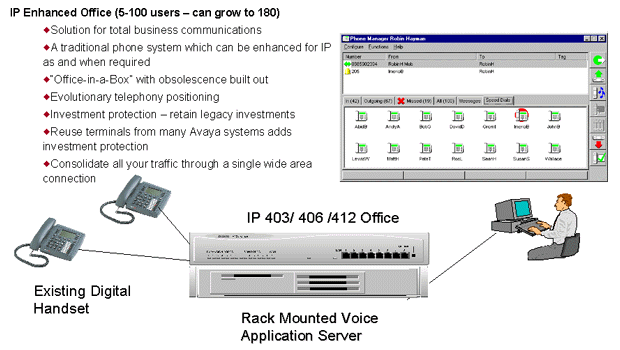
IP enhanced Avaya™ IP Office as an IP Enhanced Office Solution
Converged Avaya IP Office as a Converged Office Solution:
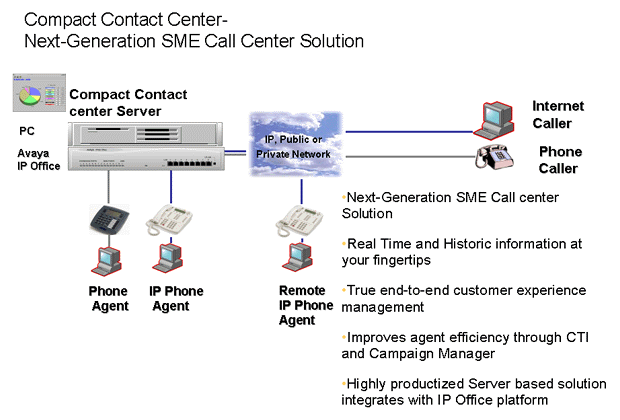
Compact Centre Avaya IP Office as a Compact Call Center Solution
Advanced Voice Applications Avaya IP Office as an IP Enhanced Office Solution: Advanced Voice Applications and Existing Terminals
Avaya IP Office is an all-in-one solution specially designed to meet the communications challenges facing the home office, small office, and medium enterprise with 2 to 180 extensions. Built on Avaya's latest advancements in converged voice and data technology, you can benefit from many of the advantages sophisticated communications deliver to your business.
Avaya IP Office gives you the flexibility to choose the solution that is right for your business. Use it as a voice solution, employing IP technology, more traditional telephony, or a combination of both, and benefit from a comprehensive set of telephony features. Use it as a data solution to deliver both local area and wide area networking capability. And because it's an all-in-one solution, you can use it as a converged solution, meeting both your voice and data requirements. Avaya IP Office also provides networking capability so you can deploy it across a number of locations with one central management point.
Avaya IP Office is an applications platform delivering the tools that can help you improve customer service and satisfaction, increase productivity, and boost your bottom line. Powerful business tools, such as customer relationship management, are supported through a range of applications, from basic call handling to full call center functionality, including real time and historic reporting.
Improve productivity with Avaya IP Office. Its sophisticated applications, including integrated messaging, voice mail, and auto attendant, can help your staff to manage calls and messages more efficiently. Support for remote working is an integral part of the Avaya IP Office, helping to ensure that home and mobile workers can work as effectively remotely as they can from an office location.
Avaya IP Office is easily managed through IP Office Manager, a Microsoft Windows-based PC software application, which connects to the Avaya IP Office system using the TCP/IP protocol.
Protect your investments with Avaya IP Office, which supports common software, telephones, and applications, and a range of device and user capacity. Expansion modules help you meet your changing or growing needs, while retaining the cost-effectiveness of your original investment.
The combination of Avaya™ IP Office and Avaya's leadership in IP telephony form a versatile, powerful backbone for your business communications. With Avaya IP Office, you can achieve greater productivity, efficiency, and cost savings across your business.
As the newest addition to the Avaya™ Enterprise Class IP Solutions (ECLIPS) family, Avaya IP Office helps deliver the value enjoyed by enterprises of every size around the world, offering high reliability, great voice quality, full-featured functionality, and rich applications, providing the simplicity, cost-effectiveness, and performance your business needs.
IP telephony allows extensions to be deployed both locally and remotely through the use of routers or virtual private network (VPN) services. Avaya IP Office flexibly supports both hard phones and PC-based softphones. By fully supporting the H.323 standard, Avaya IP Office provides standards-based interoperability between systems and devices. Multiple Avaya IP Office systems can be linked together using a standard data network, providing feature transparency and advanced applications, such as centralized voice mail.
Avaya IP Office delivers remote access to smaller businesses with non-traditional office arrangements, supporting 24 to 100 simultaneous remote users and a total community of 100 to 300 remote workers.
Secure, high-speed access to the Internet is a central feature of Avaya IP Office. Dependent on your business drivers, Avaya IP Office can let you access the Internet in a variety of ways. If your business has low Internet traffic volumes, you can opt for the dial-up connectivity option through a TI or EI line. If your enterprise requires constant Internet access, and even the ability to host a Web site, you can choose a direct leased line connection via a wide area network (WAN) port, which Avaya IP Office can support.
Avaya IP Office simplifies managing Internet access. You can define automatic adjustments in your company's bandwidth to help ensure that the right amount of bandwidth is available for Internet traffic when you need it and channeled elsewhere when you don't. As companies become more and more dependent on the Internet, for information gathering and business transactions, security becomes a significant issue. With its integral firewall, Avaya IP Office gives your business the security it needs to protect your network.
Aimed at smaller sites, Avaya IP Office delivers Voice over IP (VoIP) networking for up to 15 sites, and up to 250 users across those sites, with a high degree of feature transparency. By supporting VoIP with full Quality of Service (QoS), multiple sites can be networked together, providing a consistent, seamless system that users use wherever they are located.
VoiceMail Lite helps ensure you never miss an important message. It allows detailed, confidential messages for individuals and Hunt Groups to be left and collected 24 hours a day, 365 days a year. This application automatically answers your telephone when you are not available to take a call. You can record personal greetings, providing confirmation to callers that you will receive their message.
VoiceMail Pro is a powerful voice processing system with an easy-to-use graphical user interface (GUI) and supports message handling for individuals or groups, provides information to callers, assists the operator during periods of heavy call activity, and more. This application also allows VoiceMail Pro to dial you back, internally or externally, as soon as a voice mail message is left for you. It provides security by prompting for a PIN code should you wish to change their Forwarding or Follow Me number from an external telephone. Call flow can easily be customized, enabling you to transfer out of a mailbox to speak to a receptionist or secretary.